
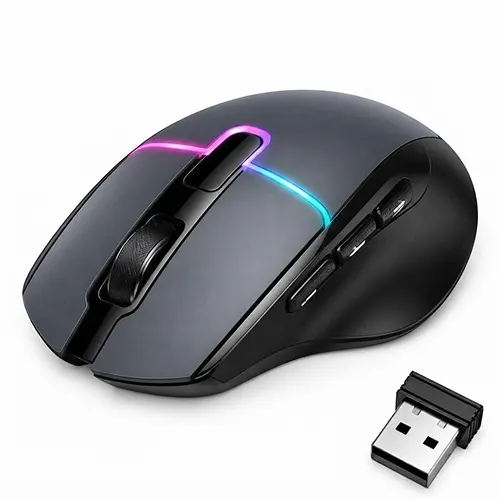
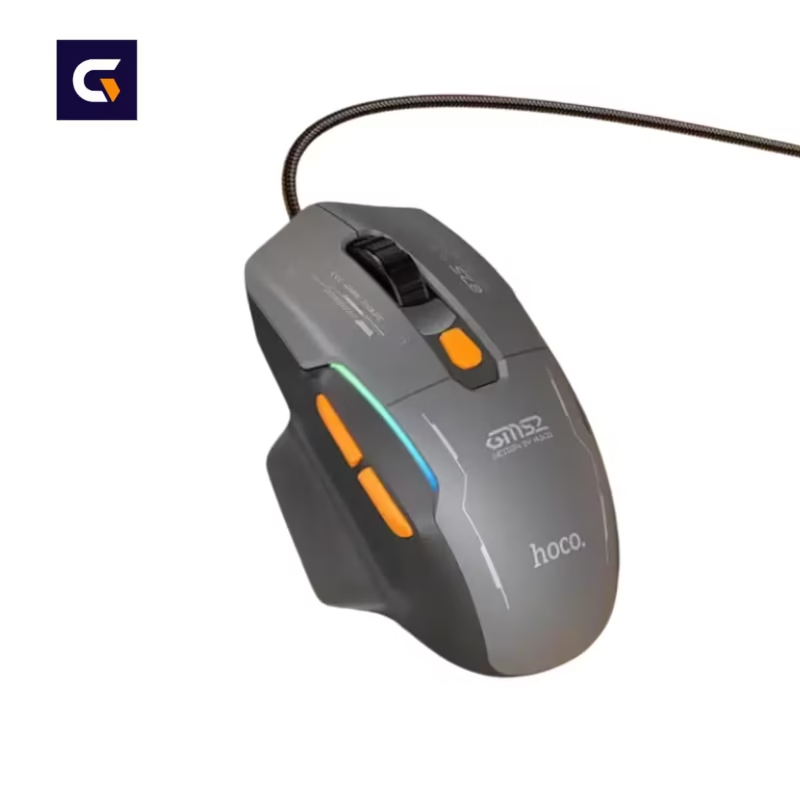
Hoco GM651 Tri-Mode Gaming Mouse 12000 DPI
1,570.00৳
Warranty: 7 Days Replacement Warranty
Available Color: Black
Hoco GM651 Tri-Mode Gaming Mouse 12000 DPI
The Hoco GM651 Tri-Mode Gaming Mouse combines adjustable sensitivity, versatile connectivity and RGB lighting in a practical gaming-focused design. With up to 12000 DPI, three connection options, and a rechargeable battery, it is suitable for compatible computers, gaming setups, study desks and everyday productivity.
Key Features of Hoco GM651 Tri-Mode Gaming Mouse
- Up to 12000 DPI: Adjustable sensitivity helps you choose a suitable cursor speed for gaming, browsing and everyday computer tasks.
- Tri-Mode Connectivity: Switch between 2.4GHz wireless, Bluetooth and wired USB connectivity to suit your device and working environment.
- Adjustable DPI Levels: Select from six listed sensitivity levels: 1000, 1600, 2400, 4800, 6400 and 12000 DPI.
- RGB Lighting: Five lighting modes add a gaming-inspired appearance to your desktop setup.
- Rechargeable Battery: The built-in 500mAh battery can be recharged through the USB Type-C port.
- Six-Button Layout: Dedicated buttons provide convenient control for common mouse functions and supported side-button actions.
- Up to 1000Hz Polling Rate: The listed maximum polling rate supports responsive input when the selected connection mode and device support it.
- Compact Design: Its approximately 80g weight and 113 × 74 × 42.5 mm dimensions make it a practical option for many desktop and laptop setups.
Product Specifications
| Specification | Details |
|---|---|
| Brand | Hoco |
| Model | GM651 |
| Product Type | Tri-Mode Gaming Mouse |
| Color | Black |
| Sensor | Optical sensor |
| Maximum DPI | 12000 DPI |
| DPI Levels | 1000 / 1600 / 2400 / 4800 / 6400 / 12000 |
| Connectivity | 2.4GHz wireless / Bluetooth 5.4 / USB wired |
| Buttons | 6 |
| Lighting | RGB, 5 modes |
| Battery Capacity | 500mAh |
| Charging Port | USB Type-C |
| Charging Time | Approximately 2 hours |
| Listed Battery Life | Up to approximately 50 hours; around 20 hours with RGB enabled |
| Polling Rate | Up to 1000Hz |
| Material | ABS |
| Dimensions | 113 × 74 × 42.5 mm |
| Weight | Approximately 80g |
| Warranty | 7 Days Replacement Warranty |
Connectivity and Everyday Performance
2.4GHz Wireless Connection
The 2.4GHz wireless mode offers a cable-free setup for compatible computers. It is useful for keeping a gaming desk tidy and allowing comfortable mouse movement without a permanently connected data cable. This mode requires the compatible wireless receiver.
Bluetooth Connectivity
Bluetooth provides another connection option for compatible laptops and other supported devices. It can help free up a USB port when you use the mouse with a Bluetooth-enabled computer. Bluetooth performance and compatibility depend on the host device and operating system.
Wired USB Connection
The wired mode offers a direct USB connection when you prefer not to use a wireless connection. It can also be useful when managing battery power. Confirm the appropriate cable and connection requirements before use.
Adjustable DPI for Different Tasks
DPI determines how far the pointer moves relative to physical mouse movement. A lower setting can help with controlled cursor movement, while a higher setting can move the pointer farther with less hand movement. The Hoco GM651 lists six DPI levels up to 12000 DPI, allowing you to select a sensitivity that feels comfortable for your screen size, application and personal preference.
A higher maximum DPI does not automatically make a mouse more accurate or make every game easier. The best setting depends on your habits, display resolution and the type of work or game you are using.
RGB Lighting and Design
The RGB lighting gives the Hoco GM651 a gaming-oriented appearance that can complement a keyboard, headset and other desktop accessories. Its black finish is easy to coordinate with many computer setups. Lighting effects are primarily a visual feature and may affect battery runtime when enabled.
Compatibility
The Hoco GM651 is listed for use with compatible Windows, macOS and Linux systems. Actual connectivity depends on the mode selected and the ports or Bluetooth capabilities available on your device.
- Desktop computers: Use a supported USB connection or the appropriate wireless mode.
- Laptops: Choose Bluetooth, 2.4GHz wireless or wired USB according to available connectivity.
- Gaming setups: Select a connection mode and DPI setting suited to your computer and preferred games.
- Office and study: Use the mouse for navigation, documents, browsing and general productivity.
Console compatibility and advanced software customisation have not been confirmed for this listing. Check the specific device requirements before purchasing if you plan to use the mouse with a console or specialised software.
Pros and Cons
Pros
- Three connection options for different supported setups.
- Adjustable sensitivity up to 12000 DPI.
- Six listed DPI levels for different cursor-speed preferences.
- RGB lighting with multiple modes.
- Rechargeable battery with USB Type-C charging.
- Relatively lightweight design at approximately 80g.
Cons
- Wireless operation requires attention to battery charge.
- RGB lighting may reduce the listed wireless runtime.
- Bluetooth may not be the preferred connection for latency-sensitive gaming.
- The ideal size, shape and button placement depend on individual hand size and grip preference.
Alternative Product
If your primary need is typing, writing or working on a compact desk rather than gaming, consider the XUNDD KB007 Foldable Wireless Keyboard. It serves a different purpose and may complement a mouse in a portable productivity setup. The Hoco GM651 remains the more relevant choice when you specifically need a gaming mouse.
Why Should You Buy the Hoco GM651 Tri-Mode Gaming Mouse?
The Hoco GM651 is worth considering if you want adjustable DPI, RGB lighting and the flexibility to switch between wired and wireless connections in one mouse. Its rechargeable battery and compact dimensions also suit mixed gaming, study and everyday computer use. Choose it if these features match your setup and preferred way of working.
Why Choose Gadget Vokto?
Gadget Vokto helps customers explore gadgets and electronics for everyday use, productivity and entertainment. Review the product specifications, available colour and stated replacement terms before ordering so you can make an informed purchase.
Warranty: This product is listed with a 7-day replacement warranty. Please retain your purchase invoice for after-sales support and review the applicable replacement conditions.
Care and Usage Tips
- Charge the mouse using a compatible USB Type-C cable.
- Keep the optical sensor area free from dust and debris.
- Use the mouse on a suitable, stable surface for consistent tracking.
- Avoid exposing the mouse to liquids, excessive heat or physical impact.
- Switch off or disconnect the mouse when appropriate to help conserve battery power.
Setup Instructions
- Charge the mouse before extended wireless use if required.
- Select the intended connection mode.
- For 2.4GHz wireless, connect the compatible receiver to your computer.
- For Bluetooth, enable Bluetooth on the host device and follow its pairing process.
- For wired use, connect the mouse through a compatible USB connection.
- Adjust the DPI level until the pointer speed feels comfortable.
Frequently Asked Questions
What is the maximum DPI of the Hoco GM651?
The listed maximum sensitivity is 12000 DPI, with six selectable DPI levels.
Does the Hoco GM651 support wired and wireless connections?
Yes. It is listed with USB wired, 2.4GHz wireless and Bluetooth 5.4 connectivity.
Does the Hoco GM651 have RGB lighting?
Yes. The listed specifications include RGB lighting with five modes.
How long does the battery last?
Published reseller specifications list up to approximately 50 hours of use, or around 20 hours with RGB enabled. Actual runtime depends on usage and settings.
What is the warranty?
The supplied product information specifies a 7-day replacement warranty. Applicable conditions should be confirmed before purchase.
Final Summary
The Hoco GM651 Tri-Mode Gaming Mouse 12000 DPI combines flexible connectivity, adjustable sensitivity, RGB lighting and rechargeable power in a black gaming-focused design. It can suit compatible computer users who want one mouse for gaming and everyday productivity. Check the specifications and replacement terms to ensure it meets your requirements.
For additional product information, consult the HOCO brand website. The exact GM651 specifications listed above should be confirmed against the supplier’s product documentation before publication.


Reviews
Clear filtersThere are no reviews yet.