Hoco UA17 2-in-1 USB Adapter Executive Overview
In today’s multi-device ecosystem, users frequently navigate between different port standards—ranging from Apple’s legacy Lightning (iP) interface on iPhones and iPads to universal USB Type-C ports on modern smartphones, Android tablets, MacBooks, and Windows laptops. Carrying individual OTG (On-The-Go) dongles for each specific device port creates cable clutter, increases the risk of lost accessories, and complicates daily productivity. Utilizing a multi-functional solution like the Hoco UA17 2-in-1 USB Adapter solves these hardware barriers seamlessly.
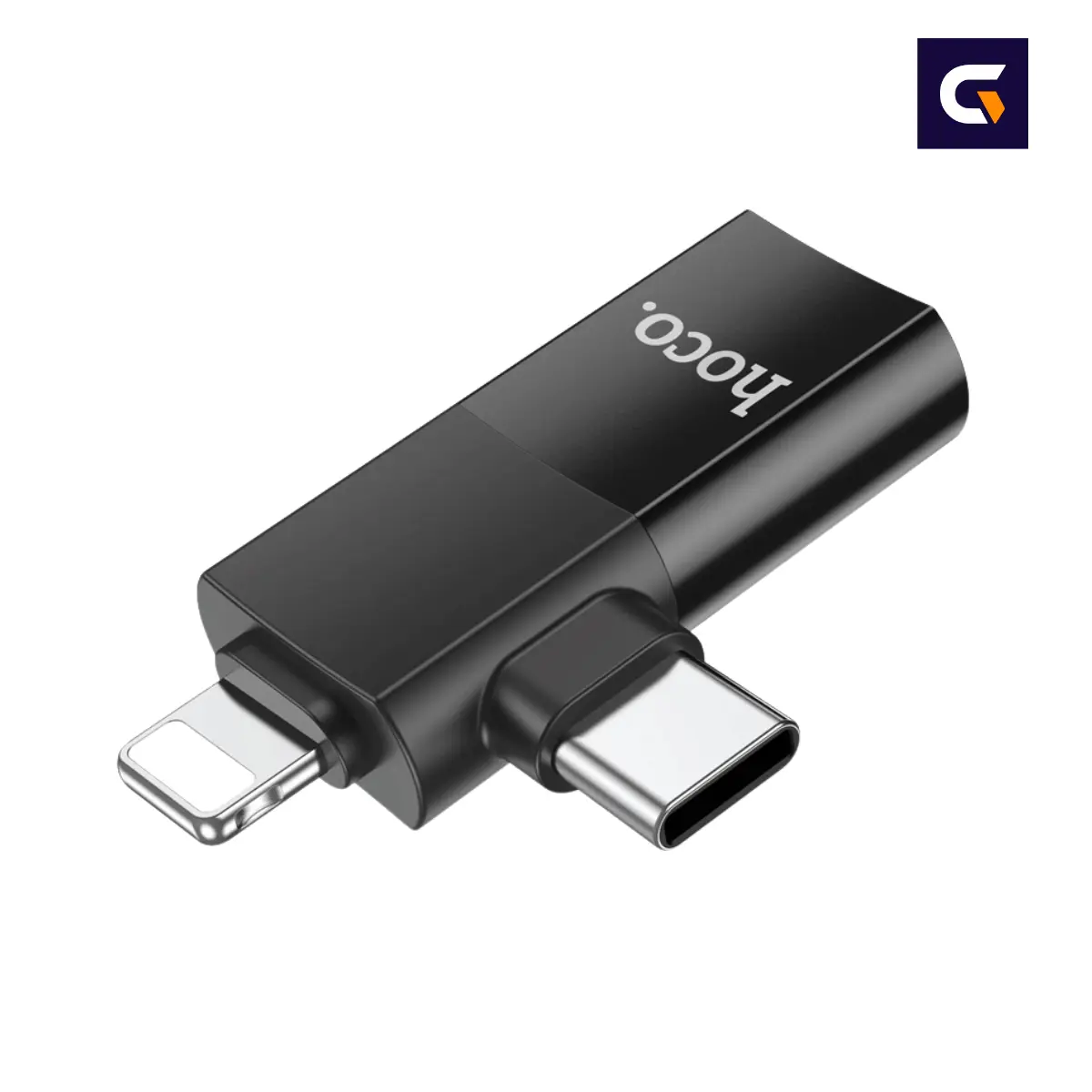
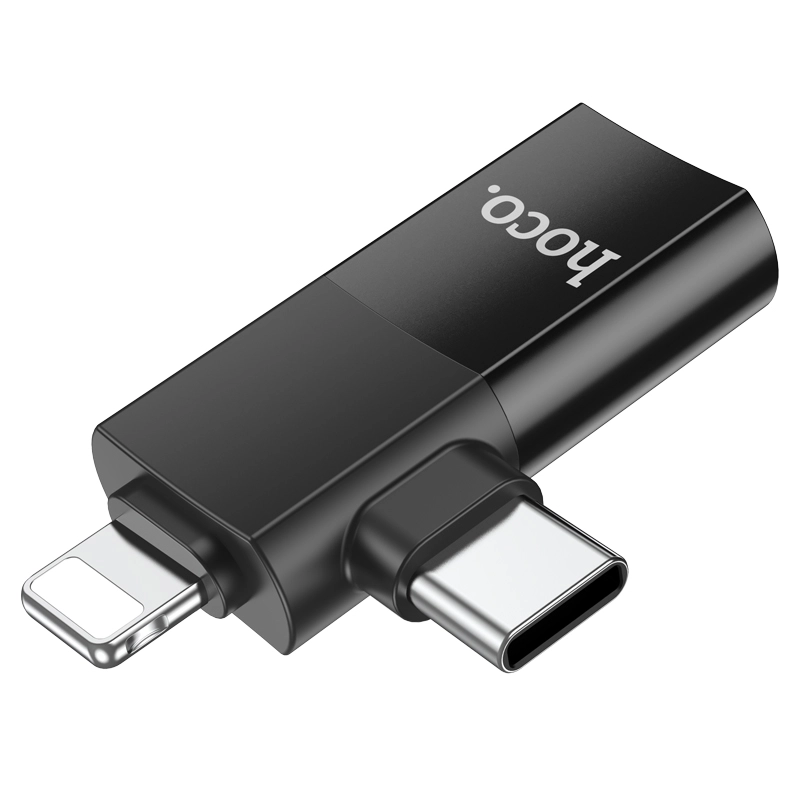
The Hoco UA17 2-in-1 USB Adapter offers a smart, all-in-one connectivity solution engineered specifically to eliminate multi-platform compatibility barriers. Featuring a dual-head input design—incorporating both a precision Lightning (iP) male connector and a USB Type-C male connector into a single mini adapter body—it routes signal lines directly into a standard USB female port. Whether you need to import photos from a flash drive directly to your iPhone, connect a wireless mouse to an Android tablet, or attach a USB keyboard to a Type-C laptop, the Hoco UA17 2-in-1 USB Adapter accomplishes it instantly without requiring extra cables or software drivers.
Manufactured by Hoco Technology Development and distributed in Bangladesh by GadgetVokto, the Hoco UA17 adapter combines metallic structural strength with aesthetic minimalism. Its ultra-compact form factor fits onto any key ring or tech pouch, making it an essential companion for students, mobile professionals, content creators, and travelers. When you order your genuine Hoco UA17 2-in-1 USB Adapter from GadgetVokto, you are guaranteed authentic hardware, transparent pricing for the Hoco UA17 price in BD, and fast nationwide home delivery.
Hoco UA17 Technical Specifications Matrix
Below are the official technical parameters and physical specifications of the Hoco UA17 2-in-1 USB Adapter:
| Specification Category | Technical Details & Capabilities |
|---|---|
| Product Name | Hoco UA17 2-in-1 iP Male / Type-C Male to USB Female Adapter |
| Brand Manufacturer | HOCO Technology Development Co., Ltd. |
| Model Identifier | UA17 / Hoco UA17 |
| Adapter Type | Hoco UA17 2-in-1 OTG Data & Peripheral Converter |
| Input Connector 1 | 1 x Lightning (iP) Male Plug |
| Input Connector 2 | 1 x USB Type-C Male Plug |
| Output Interface | 1 x USB Female Port (USB-A Standard Receptacle) |
| Data Transfer Function | USB OTG (On-The-Go) High-Speed Protocol |
| Housing Material | High-Strength Metallic Alloy Housing |
| Weight | Ultra-Lightweight (Approx. 8-10 grams) |
| Supported Peripherals | USB Pendrives, Keyboards, Mice, Card Readers, Gamepads |
| Driver Support | Plug-and-Play (No software or driver installation required) |
| System Compatibility | iOS 13.0+, Android 6.0+, macOS, Windows 11/10/8/7, ChromeOS |
| Primary Use Case | OTG File Transfer, Peripheral Access, Mobile Office Setup |
Hoco UA17 Dual-Interface Architecture: iP Male + Type-C Male Explained
The primary engineering highlight of the Hoco UA17 2-in-1 USB Adapter is its versatile dual-head connector layout. Instead of forcing users to choose between a dedicated Type-C OTG converter or an iPhone Lightning OTG adapter, HOCO has integrated both standards into a unified chassis:
- Lightning (iP) Male Connector: Fully compatible with iOS mobile devices featuring Lightning ports. The Hoco UA17 Lightning port enables direct On-The-Go (OTG) flash drive read/write access via the iOS Files app, allowing instant camera roll backups and document viewing without iTunes or cloud reliance.
- USB Type-C Male Connector: Fully compliant with USB-C OTG protocols across Android smartphones, iPad Air/Pro/Mini models with Type-C ports, MacBooks, Chromebooks, and modern Windows laptops. The Hoco UA17 Type-C connector delivers seamless plug-and-play operation.
- Standard USB Female Socket: The Hoco UA17 female USB port serves as a universal receiving port for standard USB-A peripherals including pendrives, USB mice, keyboards, memory card readers, drawing tablets, MIDI controllers, and USB gaming pads.
This dual arrangement in the Hoco UA17 2-in-1 USB Adapter eliminates the need to buy two separate adapters, serving as a unified bridge across your entire collection of mobile and desktop electronics.
Hoco UA17 Key Features & Everyday Utility
The Hoco UA17 2-in-1 USB Adapter is loaded with functional features that enhance day-to-day digital workflows:
- Hoco UA17 2-in-1 Dual Input Interface: Combines Lightning (iP) male and Type-C male connectors in one sleek body, enabling cross-platform USB connectivity for iOS, Android, macOS, and Windows.
- High-Speed Hoco UA17 OTG Data Transfer: Built-in high-performance controller IC ensures fast, stable data transfer when reading high-capacity USB flash drives, memory cards, or external storage drives through the Hoco UA17 OTG adapter.
- Broad Peripheral Support: Effortlessly connects low-power USB peripherals including optical mice, mechanical keyboards, USB barcode scanners, camera card readers, and USB audio DACs.
- Driver-Free Plug-and-Play Simplicity: The Hoco UA17 2-in-1 USB Adapter operates purely as a hardware OTG interface. No app installation, software setup, or external power source required—simply plug in and use immediately.
- Premium Hoco UA17 Metallic Construction: Wrapped in a heat-dissipating metallic body that guards against drops, surface scratches, structural bending, and daily wear in pockets or bags.
- Ultra-Portable Pocket Design: Extremely small footprint weighing under 10 grams, allowing you to carry high-capacity file access wherever you go without added weight or bulk.
- Secure & Snug Port Fit: Precision-molded connector pins in the Hoco UA17 USB adapter ensure a firm connection inside host devices, preventing accidental disconnection during file transfers.
Hoco UA17 Metallic Build Quality & Thermal Efficiency
Cheap plastic OTG adapters often crack, snap at the connector neck, or overheat during continuous data transfers. The Hoco UA17 2-in-1 USB Adapter solves these mechanical flaws through high-grade material selection:
1. Hoco UA17 Metallic Alloy Outer Shell
The chassis is constructed from a precision-cast metallic alloy that provides high tensile strength while aiding passive heat dissipation. During large file transfers—such as copying 4K video files or HD photo folders from a flash drive—the metallic housing of the Hoco UA17 adapter draws operational heat away from internal controller chips, maintaining consistent signal speeds.
2. Gold and Nickel-Plated Contact Pins
All male connector pins and female receptacle contacts on the Hoco UA17 2-in-1 USB Adapter are treated with anti-oxidation plating. This reduces contact resistance, eliminates electrical signal jitter, and protects the adapter against corrosion caused by atmospheric humidity over years of use.
3. Reinforced Internal Solder Points
The internal circuit board of the Hoco UA17 adapter features reinforced solder points connecting the dual male plugs to the master USB female housing. This structural reinforcement prevents physical disconnection even if the attached USB flash drive is bumped or pulled sideways.
Hoco UA17 Real-World Productivity & Use Cases
The Hoco UA17 2-in-1 USB Adapter expands what your mobile devices can achieve in real-world everyday scenarios across Bangladesh:
1. Direct Photo & Video Backup for iPhone Users
Running out of iCloud or local iPhone storage is a common hassle. With the Hoco UA17 2-in-1 USB Adapter, you can plug a standard USB flash drive into your iPhone via the Lightning plug, open the native iOS Files app, and immediately offload photos and videos to free up phone memory without needing a computer or Wi-Fi connection.
2. Transforming Tablets into Portable Workstations
Attach a USB mouse and full-sized USB keyboard to your Android tablet, iPad, or Surface device using the Hoco UA17 adapter. This instantly transforms your touchscreen tablet into an efficient productivity setup for writing documents, editing spreadsheets, or coding on the move.
3. On-The-Go Memory Card Reading for Photographers
Photographers and videographers can plug a USB SD/MicroSD card reader into the female port of the Hoco UA17 OTG adapter, then connect the Type-C or Lightning end directly to an iPad or Android smartphone to preview, edit, and post high-resolution DSLR photos to social media immediately after a shoot.
4. Media Playback During Travel
Load movies, TV shows, or study videos onto a portable USB drive, attach it via the Hoco UA17 USB adapter to your phone or tablet, and enjoy direct offline media playback during long commutes or flights without occupying internal storage space.
Hoco UA17 vs. Generic Single-Port OTG Adapters
Comparing the genuine Hoco UA17 2-in-1 USB Adapter against standard unbranded single-purpose OTG plugs demonstrates clear advantages:
| Feature Parameter | Hoco UA17 2-in-1 USB Adapter | Unbranded Plastic OTG Dongle |
|---|---|---|
| Connector Interface | Dual Interface (iP Male + Type-C Male) | Single Connector Only (Type-C or iP) |
| Body Construction | Durable Metallic Alloy Casing | Fragile Molded Plastic Housing |
| Cross-Platform Compatibility | Works with iOS, Android, macOS, Windows | Limited to a single port format |
| Heat Dissipation | Passive Metallic Thermal Dissipation | Traps heat inside plastic shell |
| Port Stability | Precision Gold/Nickel Plated Contacts | Loose fit; prone to accidental disconnects |
| Driver Requirement | 100% Plug-and-Play (Zero App Needed) | May require third-party app downloads |
| Warranty Protection | 7-Day Replacement Support at GadgetVokto | No Warranty or After-Sales Service |
Hoco UA17 Universal Device Compatibility Guide
The Hoco UA17 2-in-1 USB Adapter provides extensive hardware compatibility across modern consumer gadgets:
1. Apple iOS & iPadOS Devices (Lightning Interface)
- iPhones: iPhone 14, 14 Plus, 14 Pro, 14 Pro Max, iPhone 13 series, 12 series, 11 series, XS, XR, X, 8, 7, SE series running iOS 13 or newer via the Hoco UA17 Lightning connector.
- iPads: iPad (9th gen and older), iPad mini (5th gen and older), iPad Air (3rd gen and older) featuring Lightning ports.
2. USB Type-C Devices (Android, iOS & Laptops)
- Smartphones: Samsung Galaxy S24/S23/S22 series, Galaxy A-series, Xiaomi, Redmi, POCO, OnePlus, Realme, Vivo, OPPO, Google Pixel through the Hoco UA17 Type-C port.
- iPads (Type-C): iPad Pro (11-inch & 12.9-inch 3rd gen+), iPad Air (4th gen+), iPad mini (6th gen), iPad (10th gen).
- Laptops & MacBooks: Apple MacBook Air/Pro (M1/M2/M3 & Intel), Dell XPS, ASUS ZenBook, HP Spectre, Lenovo Yoga, ThinkPad, Chromebooks.
3. Compatible USB Female Peripherals
- Standard USB Flash Drives (FAT32, exFAT formatted pendrives).
- 2.4GHz Wireless Mouse and Keyboard USB Dongles using the Hoco UA17 OTG adapter.
- Multi-format USB SD / MicroSD Memory Card Readers.
- USB Gaming Controllers, USB Digital Audio DACs, Barcode Readers.
Hoco UA17 Step-by-Step OTG Usage & Setup Guide
Operating the Hoco UA17 2-in-1 USB Adapter is simple across all supported operating systems:
1. How to Use Hoco UA17 on iPhone / iPad (Lightning Port)
- Insert your USB flash drive into the USB female port of the Hoco UA17 adapter.
- Plug the Lightning (iP) male end of the Hoco UA17 into your iPhone or iPad port.
- Open the built-in Files app on your iOS device.
- Tap the Browse tab at the bottom right. Under Locations, you will see your USB Flash Drive listed.
- Tap the drive to view, copy, move, or share files directly using the Hoco UA17 2-in-1 USB Adapter.
2. How to Use Hoco UA17 on Android Smartphones & Type-C Tablets
- Ensure OTG mode is enabled on your Android phone (most modern phones have OTG turned on by default; some models like Vivo/OPPO require enabling “OTG” in System Settings).
- Attach your USB flash drive or peripheral to the Hoco UA17 female USB port.
- Plug the Type-C male connector of the Hoco UA17 adapter into your smartphone or tablet port.
- A notification showing “USB Storage Connected” will appear. Open your preferred File Manager app to access files.
3. How to Use Hoco UA17 on Laptops & MacBooks
- Connect the Type-C male end of the Hoco UA17 2-in-1 USB Adapter into any available USB-C or Thunderbolt port on your laptop.
- Plug your USB device into the female port. Your operating system (Windows / macOS) will recognize the device immediately as an external drive or HID device.
Troubleshooting Common Hoco UA17 OTG Issues
If your connected USB drive or mouse is not recognized instantly when using the Hoco UA17 2-in-1 USB Adapter, follow these quick diagnostic tips:
Issue 1: USB Flash Drive Not Showing on iPhone
- Cause: Unformatted file system or outdated iOS version.
- Solution: Ensure your iPhone is running iOS 13 or newer. Additionally, verify that your USB flash drive is formatted in exFAT or FAT32 format when connecting through the Hoco UA17 Lightning adapter (NTFS format is read-only or unsupported by iOS).
Issue 2: Android Phone Does Not Detect Pendrive
- Cause: OTG toggle turned off in settings.
- Solution: Open phone Settings > Additional Settings > OTG Connection and turn the toggle ON before plugging in the Hoco UA17 Type-C adapter.
Issue 3: High-Power External Hard Drive Fails to Spin
- Cause: Mobile phone ports cannot supply sufficient electric current to power large mechanical HDDs.
- Solution: The Hoco UA17 OTG adapter is an unpowered passive OTG converter. Use flash drives, thumb drives, or externally powered hard drives for best results.
Why Buy Hoco UA17 From GadgetVokto in Bangladesh?
Shopping for mobile accessories online demands trust in hardware authenticity, honest pricing, and responsive customer care. GadgetVokto is dedicated to supplying 100% genuine electronics across Bangladesh. When purchasing the Hoco UA17 2-in-1 USB Adapter from GadgetVokto, you enjoy key customer benefits:
- 100% Guaranteed Authenticity: Directly sourced from official HOCO distribution channels, ensuring genuine components free from fake replicas.
- Best Hoco UA17 Price in BD: Transparent pricing that provides top-tier value for your budget when checking the Hoco UA17 price in BD.
- Express Delivery Nationwide: Fast home delivery in Dhaka city and reliable courier dispatch to all districts in Bangladesh for your Hoco UA17 adapter order.
- Strict Quality Inspection: Every Hoco UA17 2-in-1 USB Adapter is physically verified prior to dispatch to eliminate dead-on-arrival issues.
- Dedicated Support Team: Responsive customer support available to assist with compatibility questions regarding the Hoco UA17 and order tracking.
Hoco UA17 Exchange, Return & Warranty Guidelines
To ensure total transparency and protect customer satisfaction when purchasing the Hoco UA17 2-in-1 USB Adapter at GadgetVokto, please review our official service guidelines:
- Mandatory Unboxing Video: Customers must record a continuous, unedited unboxing video from opening the sealed delivery box to testing the Hoco UA17 adapter with a USB device. This serves as proof in case of transit damage or missing items.
- Defect Notification Window: If any manufacturing defect or non-responsiveness is found upon arrival of your Hoco UA17 2-in-1 USB Adapter, notify GadgetVokto customer support within 24 to 48 hours with order details and video evidence.
- 7-Day Replacement Support: Confirmed functional defects in the Hoco UA17 are eligible for rapid unit replacement within 7 business days following technical review.
- Exclusions: Warranty does not cover physical crushing, water immersion, broken pins, or damage resulting from unnatural force applied to the Hoco UA17 USB adapter.
What’s Inside the Hoco UA17 Retail Box
Your factory-sealed package delivered from GadgetVokto contains:
- 1 x Authentic Hoco UA17 2-in-1 USB Adapter (iP Male / Type-C Male to USB Female)
- 1 x Hoco UA17 Official Brand Retail Packaging Box
- 1 x GadgetVokto Verification & Invoice Card
Hoco UA17 Care & Maintenance Tips
To keep your Hoco UA17 2-in-1 USB Adapter performing flawlessly over time:
- Keep Connectors Clean: Periodically clean male connector pins on the Hoco UA17 adapter with a soft, dry micro-brush to remove pocket lint or dust.
- Avoid Applying Sideways Force: When plugging in heavy USB flash drives, avoid placing heavy downward pressure on the connected Hoco UA17 2-in-1 USB Adapter.
- Store in Dry Environment: Keep the metallic Hoco UA17 adapter stored away from liquids and high humidity to preserve optical metallic luster.
Hoco UA17 Frequently Asked Questions (FAQ)
1. What is the primary function of the Hoco UA17 adapter?
The Hoco UA17 2-in-1 USB Adapter is a 2-in-1 OTG adapter that features both Lightning (iP) male and Type-C male plugs, converting them into a standard USB female port to connect USB flash drives, mice, keyboards, and card readers to smartphones, tablets, and laptops.
2. Can I use the Hoco UA17 adapter on both my iPhone and an Android phone?
Yes! Thanks to the dual interface design of the Hoco UA17 2-in-1 USB Adapter (Lightning + Type-C), you can use the exact same adapter on Lightning-based iPhones/iPads as well as Type-C Android smartphones, tablets, and MacBooks.
3. Do I need to install any app to access files on my iPhone with the Hoco UA17?
No. The Hoco UA17 adapter supports native iOS OTG functionality. You simply plug it in and open the pre-installed iOS Files app to view and transfer files.
4. Will the Hoco UA17 work with wireless mouse and keyboard receivers?
Yes. You can plug a 2.4GHz USB wireless dongle into the female USB port of the Hoco UA17 2-in-1 USB Adapter to control your tablet, laptop, or phone with a mouse and keyboard.
5. Does the Hoco UA17 2-in-1 USB Adapter require external power or battery charging?
No, the Hoco UA17 is a driver-free, unpowered plug-and-play adapter that draws low operational voltage directly from your host device’s port.
6. Can I connect an external hard drive (HDD) using the Hoco UA17 adapter?
The Hoco UA17 2-in-1 USB Adapter works seamlessly with USB flash drives, thumb drives, and card readers. High-power mechanical external hard drives may require a self-powered USB hub because mobile phone ports cannot supply heavy motor power.
7. Is the Hoco UA17 adapter made of plastic or metal?
The Hoco UA17 2-in-1 USB Adapter features a premium metallic alloy outer body that offers superior durability and heat dissipation compared to plastic adapters.
8. What file formats does the Hoco UA17 support on iPhone?
The Hoco UA17 OTG adapter supports flash drives formatted in exFAT and FAT32 file systems, allowing transfer of photos, videos, PDFs, Word documents, and audio files.
9. What is the Hoco UA17 price in BD at GadgetVokto?
GadgetVokto offers the authentic Hoco UA17 2-in-1 USB Adapter at the most competitive price in Bangladesh with fast nationwide delivery. Please check the top of this product page for real-time pricing and stock status for the best Hoco UA17 price in BD.
10. How do I claim replacement support if my Hoco UA17 adapter is defective upon delivery?
Record an unedited unboxing video when receiving your parcel. If any technical defect is present in your Hoco UA17 2-in-1 USB Adapter, submit the clip to GadgetVokto customer support within 7 days for a quick replacement.
Simplify your digital life with multi-platform OTG convenience. Order your original Hoco UA17 2-in-1 USB Adapter today from GadgetVokto for the best Hoco UA17 price in BD with fast home delivery!
Table of Contents
- Hoco UA17 2-in-1 USB Adapter Executive Overview
- Hoco UA17 Dual-Interface Architecture: iP Male + Type-C Male Explained
- Hoco UA17 Key Features & Everyday Utility
- Hoco UA17 Metallic Build Quality & Thermal Efficiency
- Hoco UA17 Real-World Productivity & Use Cases
- Hoco UA17 vs. Generic Single-Port OTG Adapters
- Hoco UA17 Technical Specifications Matrix
- Hoco UA17 Universal Device Compatibility Guide
- Hoco UA17 Step-by-Step OTG Usage & Setup Guide
- Troubleshooting Common Hoco UA17 OTG Issues
- Why Buy Hoco UA17 From GadgetVokto in Bangladesh?
- Hoco UA17 Exchange, Return & Warranty Guidelines
- What’s Inside the Hoco UA17 Retail Box
- Hoco UA17 Care & Maintenance Tips
- Hoco UA17 Frequently Asked Questions (FAQ)


Reviews
Clear filtersThere are no reviews yet.