
Product Overview
Level up your competitive gaming, audio streaming, and everyday multimedia experience with the budget-friendly yet high-performance HOCO W117 USB + AUX 3.5mm Port RGB Gaming Headphone. Designed specifically for PC gamers, console enthusiasts, and content consumers seeking rich sound acoustics and ergonomic comfort without breaking the bank, this headset combines massive 50mm dynamic drivers with dynamic visual styling.
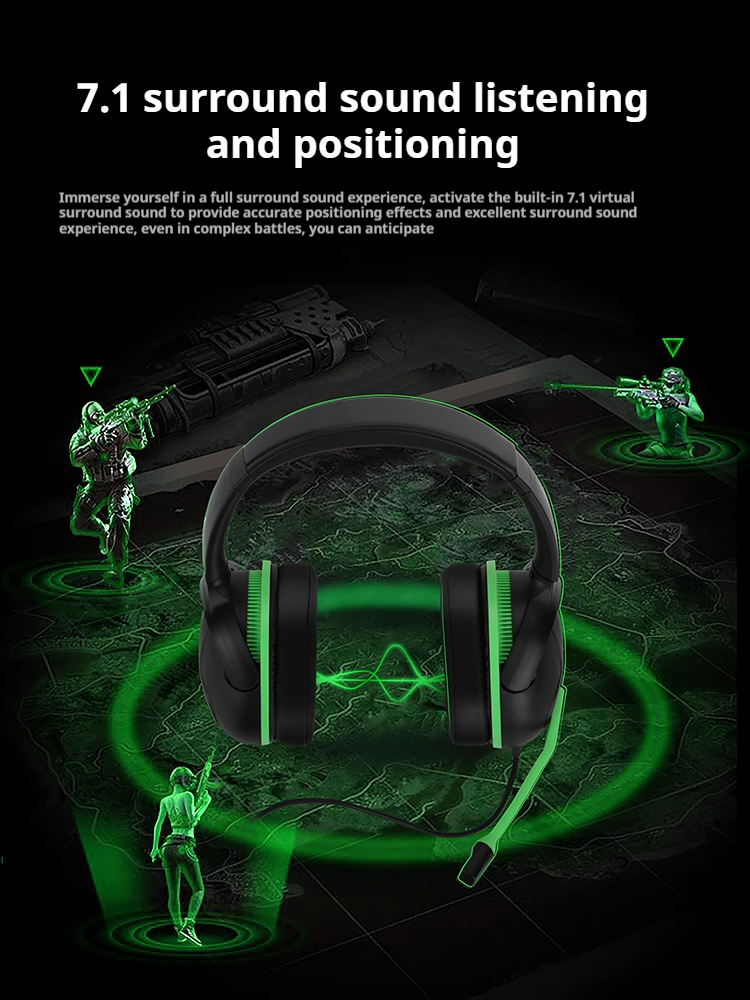
At the acoustical core of the HOCO W117 are large 50mm high-fidelity speaker drivers tuned to deliver punchy bass responses alongside crystal-clear mid and high frequencies. In fast-paced multiplayer titles like PUBG, Call of Duty, Apex Legends, and Valorant, positional audio detail is critical. The precise sound separation of the HOCO W117 enables players to identify enemy footsteps, reload sounds, distance gunshots, and subtle environmental cues with accurate spatial direction.
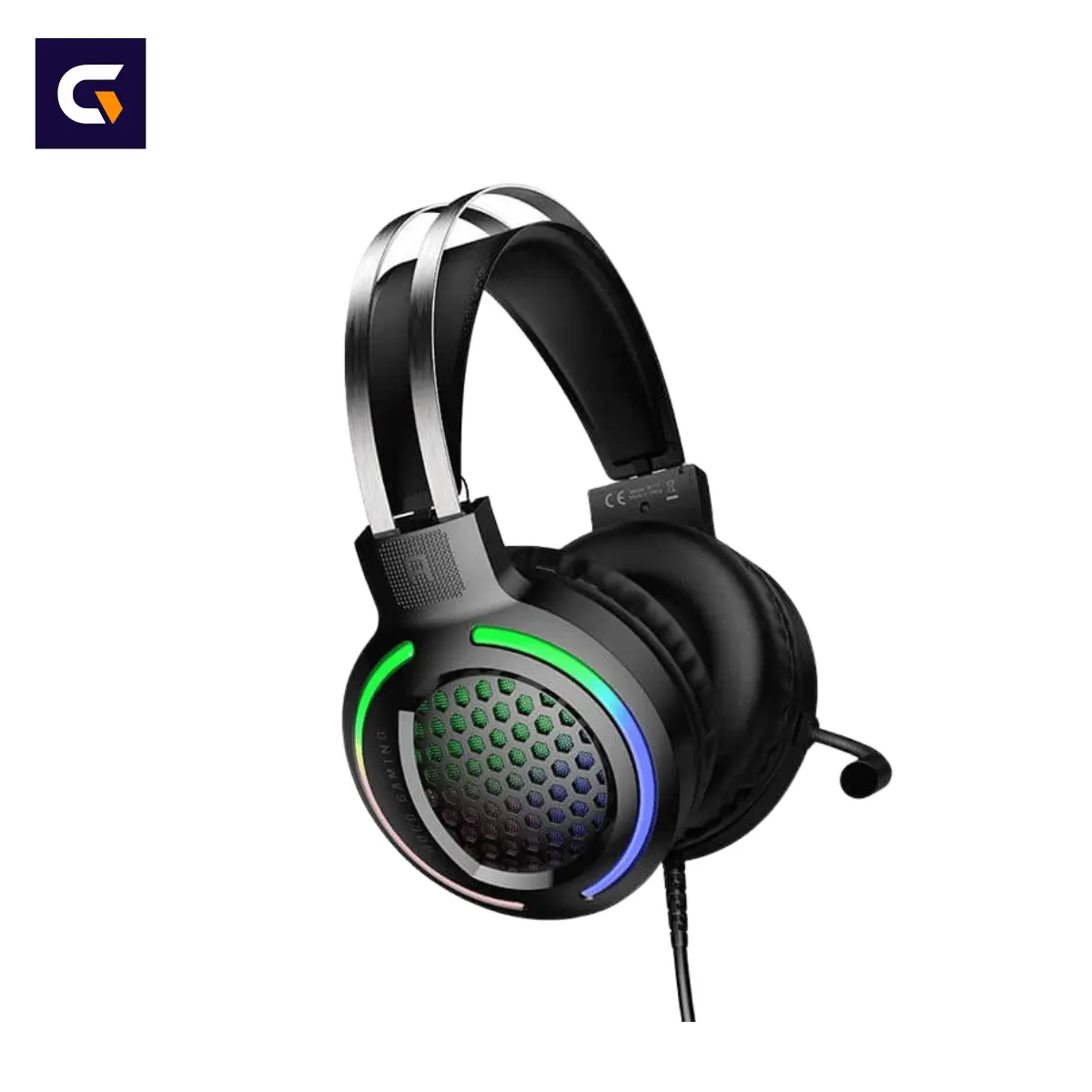
Constructed with a sturdy steel bar headband structure, soft PU leather ear cushions, an omnidirectional flexible microphone, a 2-meter heavy-duty cable, in-line volume control, dynamic 3-color RGB lighting, and an included 1-to-2 audio Y-adapter, the HOCO W117 provides everything needed for marathon gaming sessions. Purchase your 100% authentic HOCO W117 in Bangladesh directly from Gadget Vokto for reliable product verification, competitive BD pricing, and fast nationwide home delivery.
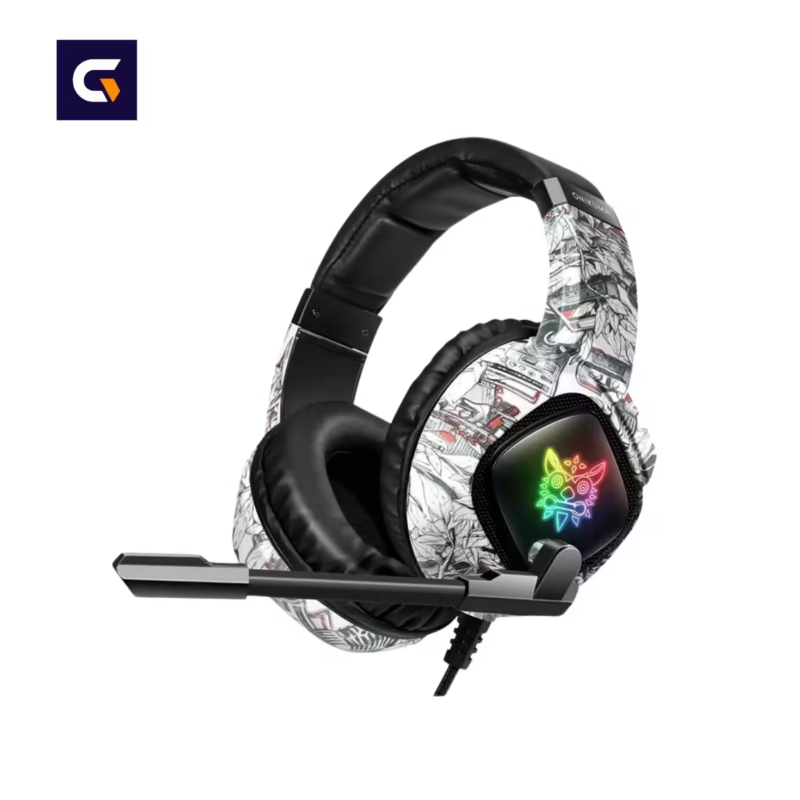
Product Visual Preview
Below is a clear visual representation displaying the durable steel-reinforced frame, plush ear cups, 3-color RGB lighting accents, and flexible boom microphone featured on the HOCO W117:

Technical Specifications
The technical specifications table below outlines all acoustic, physical, and electrical parameters for the HOCO W117:
| Specification Parameter | Technical Details & Values |
| Brand Name | HOCO |
| Product Model | W117 |
| Product Category | Over-Ear Wired RGB Gaming Headphone |
| Speaker Driver Size | 50mm High-Fidelity Dynamic Drivers |
| Main Audio Connector | Universal 3.5mm TRRS Audio Jack |
| Lighting Power Connector | Standard USB Type-A (For RGB LED Lights) |
| Microphone Type | Omnidirectional Flexible Boom Microphone |
| Microphone Capsule Size | 6.0 × 5.0 mm Electret Condenser |
| Headband Construction | Twin Steel Bar Skeleton with Soft Suspension Band |
| Ear Cushion Material | High-Density Foam wrapped in PU Synthetic Leather |
| Main Cable Length | 2.0 Meters (200cm) Durable Tangle-Resistant Cord |
| In-Line Audio Control | Analogue Rotary Volume Adjustment Wheel |
| Lighting Effect Style | Dynamic Three-Color RGB Illumination |
| Included Accessories | 1-to-2 Audio Y-Adapter Splitter Cable (Dual 3.5mm) |
| System Compatibility | Desktop PC, Laptop, Smartphones, Consoles & Tablets |
| Physical Dimensions | 22.0 × 18.3 × 10.6 cm |
| Net Headset Weight | Approximately 354 grams |
Why Choose HOCO W117 RGB Gaming Headphones?
Finding an affordable gaming headset that delivers reliable bass response, structural durability, clear voice pickup, and eye-catching aesthetics can be difficult. The HOCO W117 overcomes common budget headset shortcomings through intelligent engineering and robust materials:
- Massive 50mm High-Fidelity Drivers: Oversized dynamic driver bladders move more air to deliver deep, resonant sub-bass while maintaining clear voice and treble detail.
- Steel-Bar Headband Structure: Dual structural steel bars absorb twisting, bending, and everyday tension, preventing the plastic headband cracking common in budget headsets.
- Flexible Omnidirectional Microphone: High-sensitivity 6.0 x 5.0mm electret condenser capsule picks up clear voice audio from any position for smooth Discord and in-game comms.
- Dynamic 3-Color RGB Illumination: USB-powered tri-color LED accents illuminate the ear cup mesh grilles, creating an attractive gaming setup atmosphere.
- Plush PU Leather Ear Cushions: Thick, pressure-relieving acoustic foam pads isolate ambient room noise while cushioning your ears during multi-hour gaming sessions.
- Universal Dual-Interface Connectivity: Combines a gold-plated 3.5mm TRRS audio jack for sound with a USB connector for RGB lights, plus an included 1-to-2 Y-adapter split cable.
- Convenient In-Line Volume Control: A dedicated analog scroll wheel mounted directly on the cable allows instant, on-the-fly volume adjustment without opening software menus.
- Generous 2-Meter Cable Reach: Thick, tangle-resistant 200cm main cable offers freedom of movement around large desktop gaming desks and entertainment hubs.
Key Features & Performance Breakdown
Here is an in-depth breakdown of the acoustic, mechanical, and visual design elements integrated into the HOCO W117:
50mm High-Fidelity Dynamic Speaker Units
The foundation of any great gaming headset is its drive units. The HOCO W117 utilizes twin 50mm acoustic drivers equipped with high-energy neodymium magnets. These oversized diaphragms generate higher sound pressure levels (SPL) than standard 40mm drivers, producing rich cinematic explosions and detailed footstep rendering required for tactical awareness.
Flexible 6.0 x 5.0mm Omnidirectional Boom Mic
Clear team communication is vital during competitive squad play. The HOCO W117 incorporates an omnidirectional condenser microphone capsule housed inside a fully flexible goose-neck boom arm. You can position the mic close to your mouth or push it aside when listening to music or watching movies.
Durable Steel Bar Outer Suspension Frame
Unlike cheap plastic headsets that snap at the hinge points when stretched, the structural skeleton of the HOCO W117 uses twin high-tensile steel arch bars. Beneath the outer steel arch sits an auto-adjusting soft headband cushion that distributes weight evenly across your skull.
Dynamic Three-Color LED RGB Lighting System
Powered through a standard USB Type-A connector, the ear cups feature dynamic three-color LED illumination. The vibrant light diffuses through the ear cup mesh grilles, casting a captivating gamer glow over your desk without requiring software installation.
Acoustic Noise-Isolating Ear Pads
The over-ear cushion design wraps comfortably around your ears rather than pressing against them. High-density memory foam lined with synthetic leather creates a passive acoustic seal that suppresses ambient fan, air conditioning, and household background noise.
50mm Dynamic Driver Metallurgy & Spatial Audio Mechanics
Acoustic performance in gaming hardware relies heavily on driver diameter, magnet strength, and soundstage tuning:
In the HOCO W117, the 50mm dynamic drivers use light composite diaphragms suspended in strong magnetic fields. When electric signals pass through the copper voice coils, the enlarged surface area of the 50mm diaphragm moves significantly more air than standard budget drivers. This extra air displacement yields deeper bass extension down to 20 Hz without distorting midrange frequencies.
Because the ear cups feature a wide acoustic chamber behind the 50mm drivers, the soundstage feels open and spacious rather than closed-in or muddy. This spatial separation allows human ears to calculate sound directionality based on micro-timing differences between left and right channels. As a result, subtle audio cues—such as an enemy pulling a grenade pin behind a wall or crouching in grass—are rendered with sharp spatial clarity.
Dynamic 3-Color RGB Illumination & Dual-Cable Architecture
The HOCO W117 features a versatile dual-interface cable design that maximizes device compatibility while powering custom lighting aesthetics:
The primary cable combines a 3.5mm audio jack with a USB power connector. The 3.5mm plug handles stereo sound input and microphone voice output through a unified 4-pole TRRS pin layout, making it instantly compatible with smartphones, laptops, tablets, and modern game controllers. Meanwhile, plugging the adjacent USB connector into any active USB port activates the built-in 3-color RGB lighting engine within the ear cups.
For traditional desktop PCs equipped with separate green (headphone) and pink (microphone) 3.5mm rear motherboard ports, the package includes a 1-to-2 audio Y-adapter splitter cable. This accessory splits the single 3.5mm TRRS jack into dual TRS plugs, eliminating the need to buy extra adapters or sound cards.
Ergonomic Steel-Reinforced Frame & PU Cushioning
Comfort during long gaming sessions depends on balanced weight distribution, clamping pressure, and material breathability:
Weighing 354 grams, the HOCO W117 maintains a solid, durable feel while feeling light on your head thanks to its suspension headband architecture. The top twin steel arches absorb external physical strain, while the soft inner leatherette band rests smoothly against your head. This self-adjusting suspension mechanism eliminates manual click-notch adjustments, automatically conforming to different head sizes.
The ear cushions feature soft PU leather covers enclosing high-density rebound foam pads. The over-ear circumaural shape surrounds your ears without causing painful pinna pressure. Additionally, the soft synthetic leather resists sweat absorption and can be wiped clean easily with a dry cloth after intensive summer gaming sessions.
Best Uses for Competitive Gaming, Streaming & Daily Multimedia
Thanks to its 50mm dynamic drivers, flexible boom microphone, and versatile 3.5mm + USB connectivity, the HOCO W117 excels across various entertainment scenarios:
- FPS & Battle Royale Gaming: Gain a competitive tactical advantage in games like Valorant, PUBG, CS:GO, and Apex Legends by accurately pinpointing enemy movement and environmental sounds.
- Discord Voice Chat & Online Classes: Connect with teammates, conduct Zoom meetings, or attend online lectures using the clear 6.0 x 5.0mm omnidirectional boom microphone.
- Cinematic Movies & Action Films: Enjoy full, immersive sound effects, deep explosions, and clear dialogue when watching movies on your PC or laptop.
- Music Listening & Audio Production: Experience punchy basslines, detailed acoustic instrumentals, and crisp vocal tracks across diverse music genres.
- Work From Home & Office Calls: Everyday hands-free calling tool featuring passive acoustic noise isolation and a flexible microphone setup.
HOCO W117 vs Standard Entry-Level Gaming Headsets
The comparative matrix below illustrates why the HOCO W117 offers superior build quality and audio performance over basic budget headsets:
| Feature Comparison Category | HOCO W117 RGB Gaming Headphone | Standard Entry-Level Headsets |
| Speaker Driver Diameter | 50mm Oversized Dynamic Drivers | 40mm Small Basic Mylar Speakers |
| Headband Structure | Twin Steel Bar Skeleton (Break-resistant) | All-Plastic Headband (Prone to snapping) |
| Microphone Construction | Flexible 6.0×5.0mm Omnidirectional Boom | Rigid Plastic Short Stub Mic |
| Ear Cushion Comfort | Over-Ear Circum-Aural PU Leather Pads | On-Ear Thin Foam (Presses ears painfully) |
| Included PC Adapter | 1-to-2 Audio Y-Adapter Splitter Included | Not Included (Requires separate purchase) |
| Cable Reach & Durability | 2.0 Meters Thick Reinforced Cord | Short 1.2 Meter Thin Wire |
| Lighting Effects | Dynamic Three-Color USB-Powered RGB | No Lighting or Monochromatic Single LED |
| Volume Control Integration | Convenient In-Line Scroll Wheel | Software-only or hard-to-reach cup switch |
Step-by-Step Setup, Audio Calibration & Maintenance Guide
Follow this step-by-step connection, calibration, and routine care guide to ensure optimal audio clarity and longevity from your HOCO W117:
1. Connecting to Desktop PCs (Dual 3.5mm Ports)
Plug the primary 3.5mm TRRS jack of the headset into the female end of the included 1-to-2 Y-adapter splitter. Next, insert the green-ringed 3.5mm plug into your PC motherboard’s green audio-out port, and insert the pink-ringed 3.5mm plug into the pink microphone-in port. Finally, plug the USB connector into an active USB 2.0 or 3.0 port on your computer case to power up the RGB lighting.
2. Connecting to Laptops, Smartphones & Consoles (Single 3.5mm Combo Port)
Insert the primary 3.5mm TRRS jack directly into the combo headphone/microphone audio port on your laptop, tablet, or gaming controller. No splitter adapter is needed. Connect the USB plug to any available USB port if you wish to power the RGB lights.
3. Windows Audio Device Configuration
On your Windows PC, right-click the speaker icon in your system tray, select Sound Settings, and ensure your input device is set to “Realtek High Definition Audio” or your corresponding onboard sound card line-in. Adjust the microphone recording volume to 80%-90% and test your voice levels in Discord settings.
4. Using the In-Line Volume Scroll Wheel
The cable features an in-line analog volume wheel. If your audio sounds quiet even when your computer volume is set to 100%, check the in-line scroll wheel and turn it upward to increase the headset’s physical volume output.
5. Routine Cleaning & Storage Best Practices
Clean the PU leather ear cushions periodically using a soft, dry microfiber cloth to remove skin oils and sweat. Avoid spraying water or chemical cleaners onto the ear cups or mic capsule. Store the headset on a headphone stand or hook to maintain cushion shape and keep the 2-meter cable untangled.
Things to Check Before Buying a Gaming Headset
Keep these practical factors in mind before purchasing the HOCO W117:
- USB Function Purpose: Please note that the USB connector on the HOCO W117 powers the 3-color RGB lighting engine. Audio signals and microphone input pass through the 3.5mm AUX connection.
- PC Port Identification: Check if your desktop computer uses separate headphone and mic ports or a single unified combo jack. Use the included 1-to-2 Y-adapter for split dual-port desktop systems.
- Over-Ear Fit Check: The ear pads are designed with an over-ear profile. If you wear thick prescription glasses, position the cushions so they seal flat against your head without pinching your glasses frames.
- Authenticity Verification: Always purchase from reputable retailers like Gadget Vokto to ensure you receive an original HOCO product with full factory quality control.
Exchange & Warranty Policies
Shopping at Gadget Vokto guarantees a smooth, secure customer experience backed by transparent store policies:
- Mandatory Unboxing Video: Customers must record a clear, continuous unboxing video while opening their delivery package. This unboxing video serves as official visual proof to verify box contents and initial physical condition upon delivery.
- 100% Authenticity Guarantee: Every product listed on Gadget Vokto is guaranteed 100% genuine, original, and sourced directly from authorized distribution channels.
- Initial Defect Replacement: If your headset arrives with verified factory defects or missing parts, report it immediately with your unboxing video proof for fast replacement handling.
- Warranty Exclusion Terms: Physical damage (snapped cables, bent jacks, cracked frames), liquid spills into ear cups, or unauthorized repairs void warranty coverage.
What’s Inside the Box
Unboxing the factory retail package of the HOCO W117 reveals the following items:
- 1 x HOCO W117 USB + AUX 3.5mm Port RGB Gaming Headphone Main Unit
- 1 x 1-to-2 Audio Y-Adapter Splitter Cable (Female TRRS to Dual 3.5mm Male TRS)
- 1 x Integrated 2-Meter Cable with In-Line Volume Control
- 1 x User Operating Instructions Guide

Frequently Asked Questions
Is the HOCO W117 compatible with desktop computers?
Yes. The HOCO W117 includes a 1-to-2 audio Y-adapter splitter cable that divides the single 3.5mm connection into separate audio-out and mic-in plugs for desktop motherboards.
Does the USB connector transmit audio sound or just power the RGB lights?
The USB connector on the HOCO W117 powers the 3-color RGB LED lights. Audio playback and microphone voice signals are transmitted through the 3.5mm AUX jack.
Are the speaker drivers on the HOCO W117 50mm in size?
Yes. The HOCO W117 features oversized 50mm dynamic speaker drivers engineered for punchy bass output and detailed positional spatial audio rendering.
Can I turn off the RGB lighting on the ear cups?
Yes. If you prefer to play without lighting effects or use the headset with a mobile device, unplugging the USB connector turns off the RGB lights while audio via the 3.5mm AUX jack continues working normally.
Is the microphone on the HOCO W117 detachable?
No, the microphone is not detachable, but it features a flexible gooseneck boom arm that lets you bend and adjust its position easily.
How long is the main cable attached to the HOCO W117?
The HOCO W117 features a durable, tangle-resistant 2.0-meter (200cm) cord, offering plenty of reach across large gaming desks.
Does the headset feature a volume control wheel?
Yes. An analog rotary volume scroll wheel is integrated on the cable, allowing quick, convenient audio adjustments without opening computer menus.
Is the headband adjustable for different head sizes?
Yes. The HOCO W117 uses a flexible outer twin steel bar structure combined with an auto-adjusting soft suspension band that automatically conforms to various head sizes.
Can I use this gaming headset with a laptop?
Yes. Plugs directly into any modern laptop equipped with a standard 3.5mm audio combo jack for simultaneous stereo sound output and microphone pickup.
What is the weight of the HOCO W117 headphone?
The headset weighs approximately 354 grams, balancing durable steel bar construction with comfortable weight distribution.
Are the ear cushions comfortable for people wearing glasses?
Yes. The over-ear cushions feature high-density soft foam wrapped in synthetic leather, which helps reduce pressure on spectacle arms during extended use.
Does this headset require extra software drivers to work?
No. The HOCO W117 is a plug-and-play device that works instantly on Windows, Mac, Linux, Android, iOS, and gaming consoles without software installation.
How do I clean sweat off the ear cushions after gaming?
Gently wipe down the synthetic PU leather cushion covers with a soft, dry microfiber cloth. Avoid using harsh chemical solvents or damp alcohol wipes on the acoustic foam.
What are the store warranty conditions at Gadget Vokto?
Gadget Vokto covers verified manufacturing defects upon arrival when accompanied by a mandatory unboxing video. Physical breakage, snapped cables, and water damage void warranty coverage.
Where can I buy the original HOCO W117 RGB Gaming Headphone in BD?
You can purchase the 100% original HOCO W117 USB + AUX 3.5mm Port RGB Gaming Headphone online directly from Gadget Vokto at an affordable price of 1,250 BDT with fast nationwide home delivery across Bangladesh.
Final Thoughts
The HOCO W117 USB + AUX 3.5mm Port RGB Gaming Headphone is an exceptional value for gamers seeking strong 50mm driver acoustics, durable steel bar headband construction, a flexible, clear microphone, and vibrant RGB lighting at an accessible price point.
Order your authentic HOCO W117 today from Gadget Vokto for guaranteed product quality, unbeatable BD pricing, and fast delivery straight to your doorstep across Bangladesh!
Table of Contents
- Product Overview
- Product Visual Preview
- Why Choose HOCO W117 RGB Gaming Headphone?
- Key Features & Performance Breakdown
- 50mm Dynamic Driver Metallurgy & Spatial Audio Mechanics
- Dynamic 3-Color RGB Illumination & Dual-Cable Architecture
- Ergonomic Steel-Reinforced Frame & PU Cushioning
- Technical Specifications
- Best Uses for Competitive Gaming, Streaming & Daily Multimedia
- HOCO W117 vs Standard Entry-Level Gaming Headsets
- Step-by-Step Setup, Audio Calibration & Maintenance Guide
- Things to Check Before Buying a Gaming Headset
- Exchange & Warranty Policies
- What’s Inside the Box
- Frequently Asked Questions
- Final Thoughts
Hoco W55 Plus Extra 170H Long Usage ANC Headphone


Reviews
Clear filtersThere are no reviews yet.